Struggling to access your National Insurance policy documents? This post walks you through the exact how to download national insurance policy process on the official portal. No fluff, just steps that work today.
The NIC portal updated its layout, Most online posts miss the new policy list grouping and captcha tweaks. Whether you want your bike insurance copy from national insurance, mediclaim policy, or vehicle cover, these steps save time during renewals or claims.
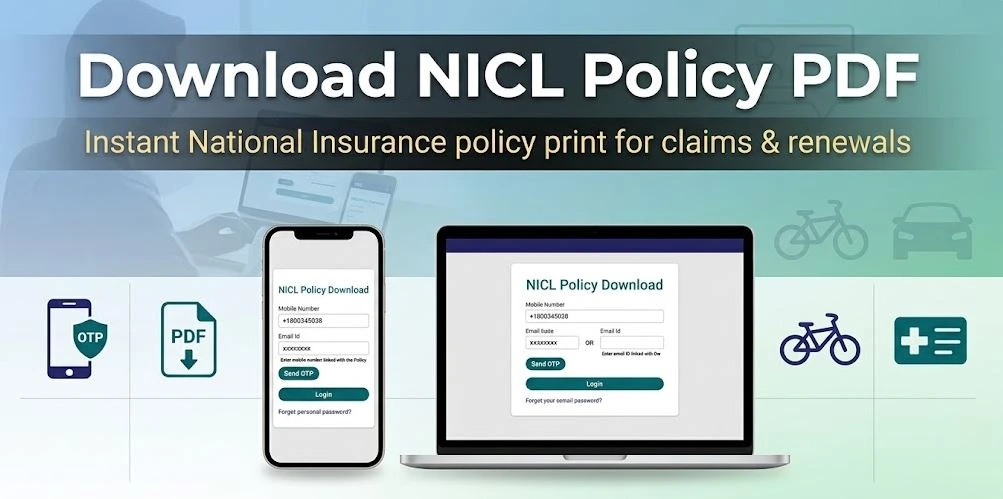
Get your registered mobile number, that’s your key. Jot down your policy number or vehicle number too. They’ll help you spot the right document fast in the list. Stable internet and Chrome work best. Skip if details changed, update via support first.
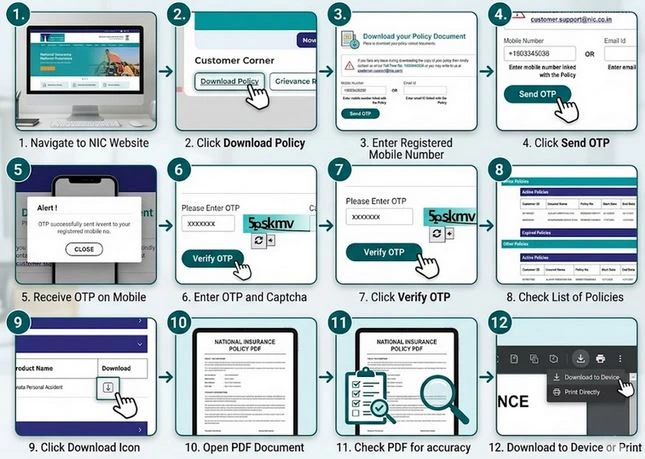
How to Download Your National Insurance Policy Online
- Navigate to the official portal at nationalinsurance.nic.co.in.
- Under the Customer Corner section, click on the Download Policy button.
- Enter the Mobile Number or Email ID registered with your policy.
- Click Send OTP. You will receive a confirmation alert once it is sent successfully.
- Enter the OTP received on your device.
- Solve the Captcha Answer as displayed in the image.
- Click Verify OTP to proceed to your dashboard.
- Review the categories for Motor, Health, or Other Policies.
- Locate your specific policy in the Active or Expired lists.
- Click the Download Icon (located in the last column of the policy row).
- Open the generated PDF document to view your details.
- Select Download to save it to your device or Print for a physical copy.
For Two Wheeler National Insurance Policy Download, check the MOTOR section.
For Two‑Wheeler National Insurance Policy Download, check the MOTOR section. If you own an electric scooter insurance with National Insurance, you can apply or upgrade coverage at the same time. National Insurance Mediclaim Policy download pdf sits under HEALTH section.
Note: If you encounter any issues during the download, contact support at 1800 345 0330 or email [email protected].
Quick Reference Table
| Category | Typical Contents | Action |
|---|---|---|
| Motor Policies | Private Car, Two Wheeler | View Details / Download |
| Health Policies | Personal Mediclaim, Family Floater | View Details / Download |
| Other Policies | Personal Accident, Home Insurance | View Details / Download |
Download by mobile number or email
Many users search for National Insurance policy download by mobile number because it is fast and simple. If your mobile number is linked to the policy, OTP verification can unlock your policy details quickly.
If your policy was issued online, the PDF copy may also be available in your registered email inbox.
Best method by situation
| Situation | Best option |
|---|---|
| Active registered mobile number | Mobile OTP |
| Email copy already received | Email inbox search |
| Policy number available | Policy number search |
| Old policy not visible online | Support or issuing office |
Finding Specific Policies Easily
The list makes it simple, no digging.
Bike or Two-Wheeler Policies
Look in Motor Policies > Active. How to download bike insurance copy from national insurance? Spot your vehicle number row and download.
Health or Mediclaim
National insurance mediclaim policy download pdf free goes here. Active covers show ready‑to‑download. Once you have the NICL mediclaim policy PDF, you can check your National Insurance TPA and network hospitals to see if your preferred hospital is cashless.
Vehicle Policies
For National insurance policy download with Vehicle number or National Insurance Vehicle Policy download PDF, scan motor rows post-OTP.
Quick Fixes for Common Issues
- OTP delay? Check signal, wait 1 min, resend.
- No policy shows? Wrong mobile? Try email option or call 1800-345-0330.
- Captcha fails? Refresh image, type exact.
- Download stuck? Allow pop-ups, right-click save PDF.
Pro tip: National insurance policy download with policy number speeds matching, scan the column.
If your policy is a third‑party (TP) only cover, you can still download the NICL policy PDF, but TP‑only claims follow a different process than comprehensive cover. If a claim has been rejected, you may also read about how to appeal a National Insurance TP claim rejection to understand your options.
Checklist Before You Start
- Registered mobile active
- Policy/vehicle number noted
- Chrome or Edge browser
- No VPN (blocks sometimes)
2026 practical tips
Save the policy PDF in two places: phone storage and cloud backup. Rename the file clearly, such as National-Insurance-Motor-Policy-2026.pdf. That makes claims and renewals easier later.
A small habit saves time during emergencies. If you manage multiple policies, create one folder only for insurance documents.
Yes. The portal groups policies by category, including motor, health, and other policies, so you can open the exact policy you need.
Confirm the registered mobile number, check network coverage, and retry the send-OTP option. If the issue continues, use the support contact shown on the official site.
Check expired section post-verification.
Verify mobile matches policy record.
The safest and fastest National Insurance policy download is straightforward when you use the official portal, your registered mobile number, and the OTP-based verification flow. The policy list is neatly divided by category, so you can quickly download the right PDF and keep it ready for claims or recordkeeping.