If you hold a National Insurance policy and want to quickly confirm whether it is active, expired, or updated with your latest details, you no longer need to wait for your agent or a branch visit. NICL now lets you verify National Insurance policy details and status online, even without a full portal login.
In this guide, you will learn:
- How to verify policy details without logging in using the NICL Verify Policy page.
- How to check National car and health insurance status using mParivahan and the NIC portal.
- How to download your National Insurance policy PDF, track claims, and avoid common mistakes.
If you are in Bangalore or any other Indian city, these steps work the same way.
Why You Must Verify National Insurance Policy Details Online
Even if you paid the premium on time, delays in data upload or wrong details can make your policy appear expired or mismatched. Verifying National insurance policy details online helps you:
- Confirm policy number, start and end date, and status instantly.
- Catch wrong vehicle details, nominee, or contact information early.
- Avoid lapses, surprise rejections, duplicate purchases, or issues during insurance policy portability.
- Track claims faster with accurate claim and policy numbers.
Instead of depending only on your agent’s assurance, one quick online check can protect yocall NICL customer careu from future hassles.
To verify your National Insurance policy online, keep these ready:
- Policy number (for motor, health, or property).
- Vehicle registration number (for motor insurance).
- Registered mobile number and email ID linked to the policy.
- Date of policy purchase or renewal (useful if you forget the policy number or face NICL policy renewal failed issues).
If you have genuinely lost the policy number, you can still verify it using the NIC “Verify Policy” page or by calling NICL customer care (details given later).
Method 1: How to Verify National Insurance Policy Without Login
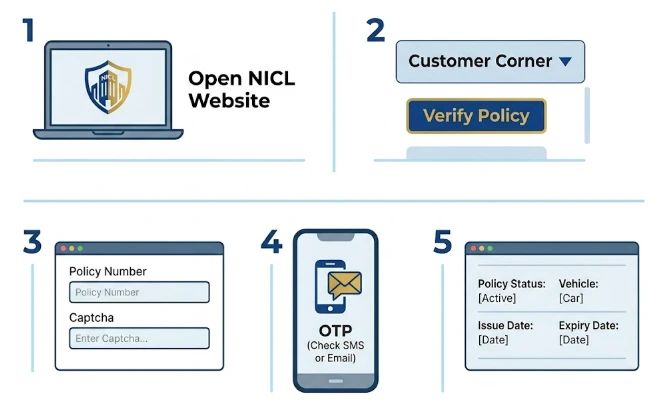
The easiest way to verify National Insurance policy details and status online is via NICL’s “Verify Policy” service, which does not require a portal login. Follow these official 2026‑updated steps carefully
Step‑by‑step: Use NIC verify‑policy page
- Open the NICL website: Go to: https://nationalinsurance.nic.co.in
- Click Verify Policy under Customer Corner
- On the homepage, locate the Customer Corner section.
- Click Verify Policy (this opens the NIC portal’s verification page).
- Access the Verify Policy page directly
- You can also open the direct link: https://nicportal.nic.co.in/nicportal/verifypolicy
- Enter Policy Number and captcha
- Click Get Policy: After entering the captcha, click Get Policy.
- Enter OTP on mobile and email
- NICL will send a 6‑digit OTP to your registered mobile number and email ID.
- Enter the OTP in the field provided.
- Click Verify OTP to complete authentication.
- View policy details and status
- After successful verification, you will see:
- Policy Number
- Name of Insured
- Effective (start) Date and Expiry Date
- Insured Name, Vehicle Details (if motor)
- Registration Number (Vehicle Number)
- Engine Number, Chassis Number
- IDV (Insured Declared Value) and Premium Amount
- Current Policy Status (Active / Expired / Cancelled, etc.)
- After successful verification, you will see:
This method lets you check National insurance policy status online without logging in to the NIC customer portal. Use it whenever you want a quick, password‑free verification.
Method 2: How to Verify via NIC Customer Portal (All Policies)
If you prefer a full dashboard view of all your NICL policies, log in to the NIC customer portal. This route is useful if you also want to download policy PDFs, update contact details, or track claims.
Step‑by‑step NIC portal login
- Visit: https://nationalinsurance.nic.co.in
- Click “Customer Login” in the top‑right corner.
- If you are a new user, click “Register here”, select Customer Type, enter your NICL customer ID, and submit.
- Complete OTP or email verification and note your login credentials.
- See all policies under your mobile number and email.
- Go to “Policy Details” / “My Policies”.
- Select the policy (motor, health, or property).
- Confirm:
- Policy number, start–end date, sum insured.
- Insured name, nominee, vehicle details (for motor).
- If anything is wrong, note the policy number and correction requirement; NICL allows online contact‑detail updates separately.
Download Policy PDF online
To download National Insurance policy copy online:
- Go to “Download Policy” or Policy Download section on the NIC portal.
- Enter your registered mobile number or email ID.
- Click “Send OTP”, enter the code, and complete captcha.
- Select the relevant NIC policy and click Download.
- Save the PDF for renewals, loans, or future checks.
This works for both National car insurance and National health insurance policies issued by NICL. For detailed steps, see our National Insurance policy download guide.
How to Check National Car Insurance Policy via mParivahan / VAHAN
For motor insurance, NICL also uploads data to the Parivahan / VAHAN system. This lets you check National car insurance policy status online using only your vehicle number, without needing a NIC portal account.
- Open Parivahan Sewa website or mParivahan app.
- Go to “Informational Services > Know Your Vehicle / Motor Insurance”.
- Enter your vehicle registration number and the captcha.
- Click Search Vehicle.
- On the result page, check:
- Insurance provider: National Insurance Company Limited
- Policy start and expiry dates
- Vehicle status (insured / uninsured).
This is very useful if you:
- Bought the policy from an agent and never received the hard copy.
- Are buying a second‑hand vehicle and want to verify the existing NIC motor cover.
What to do if policy does not show on VAHAN
Sometimes, NICL data appears on VAHAN only after 2–4 weeks of policy purchase or renewal.
If your National car insurance policy does not show:
- Wait 15–30 days after purchase before treating it as an error.
- Meanwhile, cross‑check status on the NIC verify‑policy page (Method 1) or NIC portal.
- If it still does not appear after 30 days, escalate to NICL customer care or your agent.
Using mParivahan + NIC verify‑policy page together is the safest way to verify National insurance policy details online for motor‑owning Indians.
Method 4: How to Check NICL Policy Status with Call / SMS / Branch
If you are uncomfortable with online steps, you can still verify National Insurance policy details over phone or at branch.
- NICL toll‑free: 1800 345 0330 (for general queries and policy status).
- When you call:
- Ask: Is my policy number [xxxxxx] active?
- Confirm: next due date, sum insured, and mobile/email linked.
Keep your policy number or NICL customer ID handy. Calls are usually answered within 2–3 minutes during working hours.
Check policy status at branch (ex‑NICL employee tip)
As an ex‑NICL employee, I can confirm that branches can pull your policy instantly using:
- Policy number, or
- Registered mobile number, or
- Vehicle number (for motor).
Carry:
- One government ID (Aadhaar, PAN, or driving licence).
- Any available policy copy or renewal receipt.
Ask the staff to:
- Print a policy summary.
- Confirm nominee, address, and policy status.
- Provide a branch‑specific grievance number in case of corrections. Find your nearest branch via NICL branch office details.
Physical branch verification is useful once a year, especially if you hold multiple NICL policies.
Method 5: Track National Health and Motor Claims Online
Verifying the policy is only half the job. You should also know how to track National health insurance and motor claim status online.
Track National health insurance claim status online
- Go to https://nationalinsurance.nic.co.in
- Find the Track Your Claim / Claim Status section.
- Enter:
- Policy number
- Claim number
- Date of loss or treatment
- Click Search.
- The portal will show:
- Claim registered
- Pending with surveyor / TPA
- Approved / Rejected
If you do not have the claim number, use the Missed Call option (if available) or If not, call NICL customer care (details given later) to request the status‑SMS.
Track motor claim status by policy number
For motor claims, NICL uses:
- The online claim‑status page on the NIC portal.
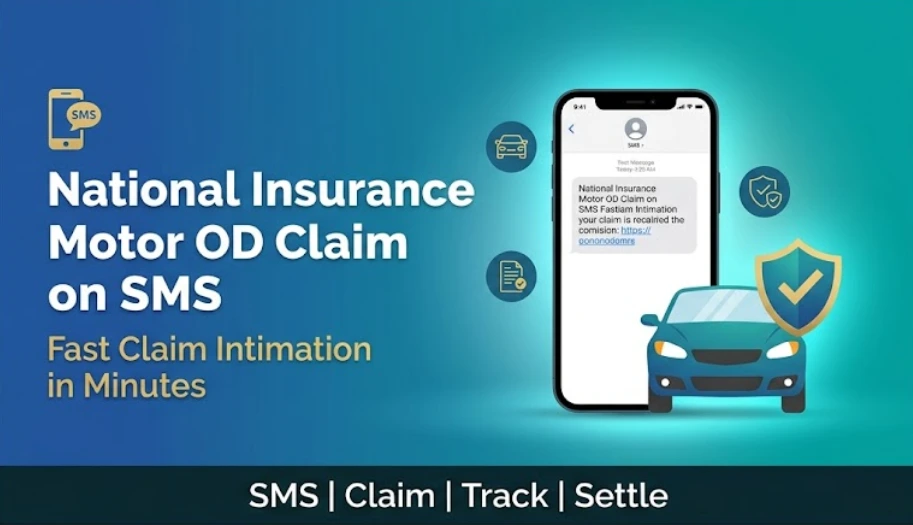
- SMS‑based OD claim registration (e.g., MOTORODCLAIM [POLICYNUMBER] sent from your registered mobile).
After filing:
- You will receive a link to upload documents.
- Updates will reflect as “Pending documents”, “Under review”, or “Settled”.
If your motor claim status remains pending documents for more than 7 days, upload the missing files or visit the branch to avoid rejection.
Use the NIC “Verify Policy” page only if you have the policy number. If not, call NICL customer care (1800 345 0330) or visit a branch with your Aadhaar and vehicle details (for motor).
Yes, on mParivahan / VAHAN “Know Your Vehicle” page, enter your vehicle registration number and captcha. The portal will show the insurer (NICL), policy start–end dates, and status.
A newly issued or renewed National insurance policy usually appears in the NIC verify‑policy page and portal within 24–72 hours. For VAHAN, it may take 2–4 weeks due to batch uploads.
Cross‑check the same policy number on (a) NIC verify‑policy page and (b) mParivahan VAHAN. If both show matching insurer, dates, and vehicle details, it is genuine. Report any mismatch to NICL immediately.
First, confirm your payment date and bank reference. Then call NICL customer care or visit your branch with payment proof. Ask them to re‑validate the renewal and update the portal within 2–3 working days.